博客

  • x86-64系统架构:栈和栈帧

    本文汇编语言均使用AT&T风格。

    1. 栈

    栈是一种线性数据结构,它遵循后进先出(LIFO,Last In First Out)原则。

    栈是处理器执行汇编代码时使用的特殊内存区域,是函数调用的重要组成部分。

    栈是内存中的一段连续空间,由RSP/RBP寄存器标记,硬件指令PUSH/POP直接操作栈,增长方向从内存高地址到低地址。栈内存由操作系统为程序分配。

    RBP(Base Pointer)栈帧基指针,指向栈帧的“底部”(实际上是栈帧中最高的内存地址)。用作访问函数参数和局部变量的参考点。

    RSP(Stack Pointer)栈指针,指向栈的“顶部”,这里是栈的最低的内存地址,随着栈的增长,RSP会被递减。

    通过以下代码示例说明栈和栈帧,C代码如下:

    int sum(int a1,int a2,int a3, int a4, int a5,int a6,int a7,int a8) {
        return a1+a2+a3+a4+a5+a6+a7+a8;
    }
    
    int sumcalc() {
        return sum(1,2,3,4,5,6,7,8);
    }

    通过gcc命令编译:“`gcc -g -o test test.c“`

    再通过GDB进行反汇编函数 sumcalc和sum:

    (gdb) disassemble/r sumcalc
    Dump of assembler code for function sumcalc:
       0x000000000000116d <+0>:     f3 0f 1e fa         endbr64
       0x0000000000001171 <+4>:     55                  push   %rbp
       0x0000000000001172 <+5>:     48 89 e5            mov    %rsp,%rbp
       0x0000000000001175 <+8>:     6a 08               push   $0x8
       0x0000000000001177 <+10>:    6a 07               push   $0x7
       0x0000000000001179 <+12>:    41 b9 06 00 00 00   mov    $0x6,%r9d
       0x000000000000117f <+18>:    41 b8 05 00 00 00   mov    $0x5,%r8d
       0x0000000000001185 <+24>:    b9 04 00 00 00      mov    $0x4,%ecx
       0x000000000000118a <+29>:    ba 03 00 00 00      mov    $0x3,%edx
       0x000000000000118f <+34>:    be 02 00 00 00      mov    $0x2,%esi
       0x0000000000001194 <+39>:    bf 01 00 00 00      mov    $0x1,%edi
       0x0000000000001199 <+44>:    e8 8b ff ff ff      call   0x1129 <sum>
       0x000000000000119e <+49>:    48 83 c4 10         add    $0x10,%rsp
       0x00000000000011a2 <+53>:    c9                  leave
       0x00000000000011a3 <+54>:    c3                  ret
    
    
    (gdb) disassemble/r sum
    Dump of assembler code for function sum:
       0x0000000000001129 <+0>:     f3 0f 1e fa   endbr64
       0x000000000000112d <+4>:     55            push   %rbp
       0x000000000000112e <+5>:     48 89 e5      mov    %rsp,%rbp
       0x0000000000001131 <+8>:     89 7d fc      mov    %edi,-0x4(%rbp)
       0x0000000000001134 <+11>:    89 75 f8      mov    %esi,-0x8(%rbp)
       0x0000000000001137 <+14>:    89 55 f4      mov    %edx,-0xc(%rbp)
       0x000000000000113a <+17>:    89 4d f0      mov    %ecx,-0x10(%rbp)
       0x000000000000113d <+20>:    44 89 45 ec   mov    %r8d,-0x14(%rbp)
       0x0000000000001141 <+24>:    44 89 4d e8   mov    %r9d,-0x18(%rbp)
       0x0000000000001145 <+28>:    8b 55 fc      mov    -0x4(%rbp),%edx
       0x0000000000001148 <+31>:    8b 45 f8      mov    -0x8(%rbp),%eax
       0x000000000000114b <+34>:    01 c2         add    %eax,%edx
       0x000000000000114d <+36>:    8b 45 f4      mov    -0xc(%rbp),%eax
       0x0000000000001150 <+39>:    01 c2         add    %eax,%edx
       0x0000000000001152 <+41>:    8b 45 f0      mov    -0x10(%rbp),%eax
       0x0000000000001155 <+44>:    01 c2         add    %eax,%edx
       0x0000000000001157 <+46>:    8b 45 ec      mov    -0x14(%rbp),%eax
       0x000000000000115a <+49>:    01 c2         add    %eax,%edx
       0x000000000000115c <+51>:    8b 45 e8      mov    -0x18(%rbp),%eax
       0x000000000000115f <+54>:    01 c2         add    %eax,%edx
       0x0000000000001161 <+56>:    8b 45 10      mov    0x10(%rbp),%eax
       0x0000000000001164 <+59>:    01 c2         add    %eax,%edx
       0x0000000000001166 <+61>:    8b 45 18      mov    0x18(%rbp),%eax
       0x0000000000001169 <+64>:    01 d0         add    %edx,%eax
       0x000000000000116b <+66>:    5d            pop    %rbp
       0x000000000000116c <+67>:    c3            ret

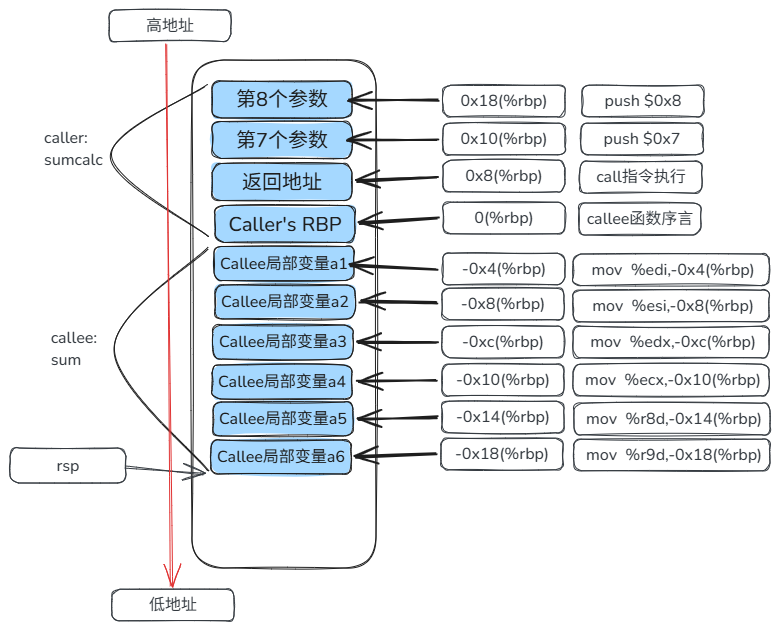
    通过上述反汇编代码可以得出如图所示的栈&帧结构如下:

    2. 栈帧

    当调用函数时会建立一个栈帧以支持该函数。栈帧由函数序言(prologue)建立,通过函数后记(epilogue)进行清理。

    函数序言和后记均由编译器生成,固定模板如下:

    函数序言&后记:

    sum:
        # 函数序言
        push %rbp        # 保存caller函数的rbp
        mov %rsp, %rbp   # 生成当前函数callee的帧基址,callee函数帧的起始位置
        
        
        # 函数后记
        mov %rbp, %rsp   # 释放当前函数callee的栈帧
        pop %rbp         # 恢复caller的栈帧
        ret              # 从栈中弹出返回地址并跳到该地址,控制权返回给caller

    如上图所示,栈帧中通常包含以下组成部分:

    1)返回地址

    2)保存的基指针(RBP)

    3)局部变量

    4)函数参数(当函数参数的数量大于6个时使用栈传递)

  • Ubuntu系统切换Python版本

    本文使用的Ubuntu系统是WSL的Ubuntu-26.04版本,当前系统默认安装的Python版本是3.14。

    本文主要通过Deadsnakes的PPA源来安装其他Python版本,并通过`update-alternatives` 命令来切换Python版本。

    安装仓库并添加PPA

    # 安装仓库
    sudo apt install software-properties-common
    # 添加ppa
    sudo add-apt-repository ppa:deadsnakes/ppa
    # 更新apt
    sudo apt update

    安装Python

    查看系统当前python版本:

    $ python3 --version
    Python 3.14.4

    安装Python3.13版本:

    $ apt install python3.13
    

    查看系统所有python版本:

    $ ll /usr/bin/python*
    lrwxrwxrwx 1 root root      10 Mar 21 17:46 /usr/bin/python3@ -> python3.14
    -rwxr-xr-x 1 root root 6671680 Aug  6 19:06 /usr/bin/python3.13*
    -rwxr-xr-x 1 root root 7477096 Apr  8 12:02 /usr/bin/python3.14*

    切换Python版本

    向 “`update-alternatives“`添加需要管理的版本:

    # 添加Python3.13版本
    $ sudo update-alternatives --install /usr/bin/python3 python3 /usr/bin/python3.13 1
    update-alternatives: using /usr/bin/python3.13 to provide /usr/bin/python3 (python3) in auto mode
    
    # 添加Python3.14版本
    $ sudo update-alternatives --install /usr/bin/python3 python3 /usr/bin/python3.14 2
    update-alternatives: using /usr/bin/python3.14 to provide /usr/bin/python3 (python3) in auto mode
    
    $ sudo update-alternatives --config python3
    There are 2 choices for the alternative python3 (providing /usr/bin/python3).
    
      Selection    Path                 Priority   Status
    ------------------------------------------------------------
    * 0            /usr/bin/python3.14   2         auto mode
      1            /usr/bin/python3.13   1         manual mode
      2            /usr/bin/python3.14   2         manual mode
    
    Press <enter> to keep the current choice[*], or type selection number: 1
    update-alternatives: using /usr/bin/python3.13 to provide /usr/bin/python3 (python3) in manual mode
    
    # 查看系统当前Python版本号
    $ python3 --version
    Python 3.13.15

  • 动态数据源切换

    (本文基于Springboot+MyBatis)

    背景:业务数据和其他业务的数据都在一个库中,而库中的表也很多,因此需要为自己的业务独立建库,并在新库中创建和老库中结构相同的业务表(自己业务使用到的表)。

    整体流程:

    1. 用户 -> 新库: 新建业务表
    2. 老库 -> 新库: 同步数据
    3. 用户 –> 新库: 暂停新库写操作
    4. 新库 -> 老库: 反向同步数据
    5. 用户 -> 新库: 恢复新库写操作

    1.方案

    在Mapper层接口方法执行前进行动态数据源的切换。即使用AOP切面,切点是Mapper接口中的所有方法,并在mapper层的AOP切面中修改线程变量进行数据源切换。

    2.实现步骤

    2.1 数据源配置

        <!-- 老库数据源1的配置 -->
        <bean id="dataSource1" class="com.zaxxer.hikari.HikariDataSource">
            <property name="jdbcUrl" value="jdbc:mysql://localhost:3306/test1"/>
            <property name="username" value="root"/>
            <property name="password" value="123456"/>
            <property name="driverClassName" value="com.mysql.cj.jdbc.Driver"/>
        </bean>
        <bean id="ds1SqlSessionFactory" class="org.mybatis.spring.SqlSessionFactoryBean">
            <property name="dataSource" ref="dataSource1" />
            <property name="configLocation" value="classpath:com/example/demo/common/dal/mybatis-config.xml"/>
            <property name="mapperLocations" value="classpath:com/example/demo/common/dal/ds1/mapper/*Mapper.xml"/>
        </bean>
        <bean id="ds1SqlSessionTemplate" class="org.mybatis.spring.SqlSessionTemplate">
            <constructor-arg index="0" ref="ds1SqlSessionFactory"/>
        </bean>
    
        <!-- 新库数据源2的配置 -->
        <bean id="dataSource2" class="com.zaxxer.hikari.HikariDataSource">
            <property name="jdbcUrl" value="jdbc:mysql://localhost:3306/test2"/>
            <property name="username" value="root"/>
            <property name="password" value="123456"/>
            <property name="driverClassName" value="com.mysql.cj.jdbc.Driver"/>
        </bean>
        <bean id="ds2SqlSessionFactory" class="org.mybatis.spring.SqlSessionFactoryBean">
            <property name="dataSource" ref="dataSource2" />
            <property name="configLocation" value="classpath:com/example/demo/common/dal/mybatis-config.xml"/>
            <!-- 这里使用通配符是因为要通用ds1的mapper -->
            <property name="mapperLocations" value="classpath:com/example/demo/common/dal/**/mapper/*Mapper.xml"/>
        </bean>
        <bean id="ds2SqlSessionTemplate" class="org.mybatis.spring.SqlSessionTemplate">
            <constructor-arg index="0" ref="ds2SqlSessionFactory"/>
        </bean>

    2.2 通用代码部分

    import lombok.Getter;
    
    @Getter
    public enum DataSourceType {
        DS_1("dataSource1"),
        DS_2("dataSource2");
    
        private String value;
        DataSourceType(String value) {
            this.value = value;
        }
    
        public static DataSourceType getByValue(String value) {
            for (DataSourceType type : DataSourceType.values()) {
                if (type.value.equals(value)) {
                    return type;
                }
            }
            return DS_1;
        }
    }
    
    // 线程变量管理
    public class DynamicDataSourceContextHolder {
    
        private static final ThreadLocal<DataSourceType> CURRENT_MAPPER_CONTEXT = new ThreadLocal<>();
    
        public static void setCurrentMapperType(DataSourceType dataSourceType) {
            CURRENT_MAPPER_CONTEXT.set(dataSourceType);
        }
    
        public static DataSourceType getCurrentMapperType() {
            return CURRENT_MAPPER_CONTEXT.get();
        }
    
        public static void clearCurrentMapperType() {
            CURRENT_MAPPER_CONTEXT.remove();
        }
    }

    2.3 实现动态数据源

    动态数据源需要实现org.springframework.jdbc.datasource.lookup.AbstractRoutingDataSource抽象类,并实现其determineCurrentLookupKey方法。

    import com.google.common.base.MoreObjects;
    import lombok.extern.slf4j.Slf4j;
    import org.springframework.jdbc.datasource.lookup.AbstractRoutingDataSource;
    
    import java.util.HashMap;
    import java.util.Map;
    import java.util.Objects;
    
    
    @Slf4j
    public class DynamicDataSource extends AbstractRoutingDataSource {
        private static Map<Object,Object> dataSourceMap = new HashMap<Object, Object>();
    
        @Override
        public void setTargetDataSources(Map<Object, Object> targetDataSources) {
            super.setTargetDataSources(targetDataSources);
            dataSourceMap.putAll(targetDataSources);
            super.afterPropertiesSet();// 必须添加该句,否则新添加数据源无法识别到
        }
    
        @Override
        protected Object determineCurrentLookupKey() {
            // Mapper层方法切面设值
            DataSourceType currentMapper = DynamicDataSourceContextHolder.getCurrentMapperType();
            if (Objects.isNull(currentMapper)) {
                // 默认使用老库的数据源
                log.info("determineCurrentLookupKey, dataSourceType: {}", DataSourceType.DS_1);
                return null;
            }
    
            // 如果currentMapper不为空,则使用currentMapper
            log.info("determineCurrentLookupKey, dataSourceType:{}", currentMapper);
            return dataSourceType1.getValue();
        }
    }

    2.4 配置动态数据源

    将多个数据源都配置到动态数据源中。并将SqlSessionFactory、SqlSessionTemplate和PlatformTransactionManager都指向动态数据源的实例。

    import com.google.common.collect.Lists;
    import org.apache.ibatis.session.SqlSessionFactory;
    import org.mybatis.spring.SqlSessionFactoryBean;
    import org.mybatis.spring.SqlSessionTemplate;
    import org.mybatis.spring.mapper.MapperScannerConfigurer;
    import org.springframework.beans.factory.annotation.Qualifier;
    import org.springframework.boot.autoconfigure.AutoConfigureBefore;
    import org.springframework.boot.autoconfigure.jdbc.DataSourceAutoConfiguration;
    import org.springframework.context.annotation.Bean;
    import org.springframework.context.annotation.Configuration;
    import org.springframework.context.annotation.Primary;
    import org.springframework.core.io.Resource;
    import org.springframework.core.io.support.PathMatchingResourcePatternResolver;
    import org.springframework.jdbc.datasource.DataSourceTransactionManager;
    import org.springframework.transaction.PlatformTransactionManager;
    
    import javax.sql.DataSource;
    import java.util.HashMap;
    import java.util.List;
    import java.util.Map;
    
    @Configuration
    @AutoConfigureBefore(DataSourceAutoConfiguration.class)
    public class DynamicDataSourceConfig {
        // 将多个数据源统一放置到动态数据源中
        @Primary
        @Bean("dynamicDataSource")
        public DynamicDataSource dynamicDataSource(@Qualifier("dataSource1") DataSource master,
                                        @Qualifier("dataSource2") DataSource slave) {
            DynamicDataSource ds = new DynamicDataSource();
            // 设置默认数据源
            ds.setDefaultTargetDataSource(master);
            // 设置数据源集合
            Map<Object, Object> dataSourceList = new HashMap<>();
            // 旧数据源
            dataSourceList.put("dataSource1", master);
            // 新数据源
            dataSourceList.put("dataSource2", slave);
            ds.setTargetDataSources(dataSourceList);
            return ds;
        }
    
        // 将SqlSessionFactory指向动态数据源
        @Bean("dynamicSqlSessionFactory")
        public SqlSessionFactory dynamicSqlSessionFactory(@Qualifier("dynamicDataSource")
                                                                      DynamicDataSource dynamicDataSource) throws Exception {
            SqlSessionFactoryBean fb = new SqlSessionFactoryBean();
            fb.setDataSource(dynamicDataSource);
            // 设置Mybatis的配置文件
            fb.setConfigLocation(new PathMatchingResourcePatternResolver().getResource("classpath:com/example/demo/common/dal/mybatis-config.xml"));
            // 设置Mapper XML文件的位置
            List<Resource> resources = Lists.newArrayList();
            resources.add(new PathMatchingResourcePatternResolver().getResource("classpath:com/example/demo/common/dal/ds1/mapper/*Mapper.xml"));
            resources.add(new PathMatchingResourcePatternResolver().getResource("classpath:com/example/demo/common/dal/ds2/mapper/*Mapper.xml"));
            fb.setMapperLocations(resources.toArray(new Resource[resources.size()]));
            //返回对象
            return fb.getObject();
        }
    
        // SqlSession
        @Bean("dynamicSqlSessionTemplate")
        public SqlSessionTemplate dynamicSqlSessionTemplate(@Qualifier("dynamicSqlSessionFactory")
                                                                    SqlSessionFactory dynamicSqlSessionFactory) {
            return new  SqlSessionTemplate(dynamicSqlSessionFactory);
        }
    
        // 扫描指定包路径下的Mapper接口,并注册成Spring Bean,并绑定到数据源上
        // BeanDefinitionRegistryPostProcessor:Mybatis-spring的后置处理器
        // 推荐使用 @MapperScan 方式,简洁
        @Bean
        public MapperScannerConfigurer mapperScannerCOnfigurer() {
            MapperScannerConfigurer msc = new MapperScannerConfigurer();
            // 指定mapper接口的包路径,多个时使用逗号分隔
            msc.setBasePackage("com.example.demo.common.dal.ds1.mapper,com.example.demo.common.dal.ds2.mapper");
            // 绑定数据源
            msc.setSqlSessionTemplateBeanName("dynamicSqlSessionTemplate");
            return msc;
        }
    
        // 主事务管理器
        @Primary
        @Bean(name="dynamicTransactionManager")
        public PlatformTransactionManager dynamicTransactionManager(@Qualifier("dynamicDataSource")
                                                                                DynamicDataSource dynamicDataSource) {
            DataSourceTransactionManager mg = new DataSourceTransactionManager(dynamicDataSource);
            mg.setNestedTransactionAllowed(true);
            return mg;
        }
    }


    2.5 Mapper层切面

    import com.example.demo.common.dal.config.DataSourceType;
    import com.example.demo.common.dal.config.DynamicDataSourceContextHolder;
    import com.example.demo.common.dal.config.MultiSqlSessionManager;
    import lombok.extern.slf4j.Slf4j;
    import org.apache.ibatis.session.SqlSession;
    import org.aspectj.lang.ProceedingJoinPoint;
    import org.aspectj.lang.annotation.Around;
    import org.aspectj.lang.annotation.Aspect;
    import org.aspectj.lang.annotation.Pointcut;
    import org.aspectj.lang.reflect.MethodSignature;
    import org.springframework.beans.factory.annotation.Autowired;
    import org.springframework.stereotype.Component;
    
    import java.lang.reflect.Method;
    import java.util.HashMap;
    import java.util.Map;
    import java.util.Objects;
    
    @Slf4j
    @Aspect
    @Component
    public class MapperTestAspect {
        @Pointcut("execution(* com.example.demo.common.dal.ds1.mapper.*.*(..))")
        public void mapperInterface1() {
        }
    
        @Pointcut("execution(* com.example.demo.common.dal.ds2.mapper.*.*(..))")
        public void mapperInterface2() {
        }
    
        private final Map<String, String> mapps = new HashMap(){{
            put("com.example.demo.common.dal.ds1.mapper.StudentInfoMapper", "dataSource1");
            put("com.example.demo.common.dal.ds2.mapper.TeacherInfoMapper", "dataSource2");
        }};
        
        @Around("mapperInterface1() || mapperInterface2()")
        public Object around(ProceedingJoinPoint joinPoint) throws Throwable {
            MethodSignature signature = (MethodSignature) joinPoint.getSignature();
            Method method = signature.getMethod();
            String mapperClassName = method.getDeclaringClass().getName();
            DataSourceType currentMapper = DynamicDataSourceContextHolder.getCurrentMapperType();
            // 根据Mapper接口的全限定名获取对应的数据源名称,动态配置中获取,Nacos或drm
            String dataSourceName = mapps.get(mapperClassName);
            DataSourceType dataSourceType = DataSourceType.getByValue(dataSourceName);
            log.info("当前使用的数据源,currentMapperDataSource={},toMapperDataSource:{},mapperClassName:{}#{}", currentMapper,
                    Objects.isNull(dataSourceType) ? "null" : dataSourceType.getValue(), mapperClassName, method.getName());
            try {
                DynamicDataSourceContextHolder.setCurrentMapperType(dataSourceType);
                return joinPoint.proceed();
            } finally {
                DynamicDataSourceContextHolder.clearCurrentMapperType();
            }
        }
    }

    以上代码在无事务操作的方法中,可以做到随时切换数据源操作。

    3. 事务中切换数据源

    使用上面的代码时虽然日志会显示切换了数据源但其实并没有,这是由于事务开启时已经绑定了数据源,并调用了DataSource.getConnection()方法,将数据源绑定到了当前线程。要解决这个怎么整呢?下文讲述了一种不使用分布式事务的方式来实现多数据源事务中正确使用对应数据源的方法,即使用SqlSession。

    3.1 SqlSession管理类

    import org.apache.ibatis.session.SqlSession;
    import org.springframework.beans.factory.annotation.Autowired;
    import org.springframework.beans.factory.annotation.Qualifier;
    import org.springframework.stereotype.Component;
    
    @Component
    public class MultiSqlSessionManager {
        @Autowired
        @Qualifier("ds1SqlSessionTemplate")
        private SqlSession sqlSession1;  // 对应dataSource1
    
        @Autowired
        @Qualifier("ds2SqlSessionTemplate")
        private SqlSession sqlSession2;  // 对应dataSource2
    
        public SqlSession getSqlSession(String dataSourceKey) {
            if ("dataSource1".equals(dataSourceKey)) {
                return sqlSession1;
            } else if ("dataSource2".equals(dataSourceKey)) {
                return sqlSession2;
            }
            return sqlSession1;
        }
    }
    

    3.2 改造Mapper切面

    注入SqlSession管理类,并新增了是否启用多数据源事务的判断。

        @Autowired
        private MultiSqlSessionManager multiSqlSessionManager;
        
        @Around("mapperInterface1() || mapperInterface2()")
        public Object around(ProceedingJoinPoint joinPoint) throws Throwable {
            MethodSignature signature = (MethodSignature) joinPoint.getSignature();
            Method method = signature.getMethod();
            String mapperClassName = method.getDeclaringClass().getName();
            DataSourceType currentMapper = DynamicDataSourceContextHolder.getCurrentMapperType();
            // 根据Mapper接口的全限定名获取对应的数据源名称,动态配置中获取,Nacos或drm
            String dataSourceName = mapps.get(mapperClassName);
            DataSourceType dataSourceType = DataSourceType.getByValue(dataSourceName);
            log.info("当前使用的数据源,currentMapperDataSource={},toMapperDataSource:{},mapperClassName:{}#{}", currentMapper,
                    Objects.isNull(dataSourceType) ? "null" : dataSourceType.getValue(), mapperClassName, method.getName());
            
            // 是否启用了多数据源事务
            Boolean enableMultiTransaction = TransactionManageAspect.getEnableMultiTransaction();
            if (Objects.nonNull(enableMultiTransaction) && enableMultiTransaction) {
    
                // 获取对应的SqlSession
                SqlSession targetSqlSession = multiSqlSessionManager.getSqlSession(dataSourceType.getValue());
                // 获取Mapper接口
                Class<?> mapperInterface = method.getDeclaringClass();
                // 从目标SqlSession中获取Mapper实例
                Object targetMapper = targetSqlSession.getMapper(mapperInterface);
    
                // 执行方法
                Object[] args = joinPoint.getArgs();
    
                return method.invoke(targetMapper, args);
            }
            try {
                DynamicDataSourceContextHolder.setCurrentMapperType(dataSourceType);
                return joinPoint.proceed();
            } finally {
                DynamicDataSourceContextHolder.clearCurrentMapperType();
            }
        }

    3.3 改造多数据源事务切面

    本切面在上一篇文章已经介绍过,下面改造后的全部代码。新增了线程变量ENABLE_MULTI_DS和获取其值的方法:getEnableMultiTransaction。

    package com.example.demo.common.dal.aspect;
    
    import lombok.extern.slf4j.Slf4j;
    import org.aspectj.lang.ProceedingJoinPoint;
    import org.aspectj.lang.annotation.Around;
    import org.aspectj.lang.annotation.Aspect;
    import org.aspectj.lang.annotation.Pointcut;
    import org.aspectj.lang.reflect.MethodSignature;
    import org.springframework.context.ApplicationContext;
    import org.springframework.core.annotation.Order;
    import org.springframework.jdbc.datasource.DataSourceTransactionManager;
    import org.springframework.stereotype.Component;
    import org.springframework.transaction.TransactionStatus;
    import org.springframework.transaction.support.DefaultTransactionDefinition;
    import org.springframework.util.CollectionUtils;
    
    import javax.annotation.Resource;
    import java.lang.reflect.Method;
    import java.util.Arrays;
    import java.util.List;
    import java.util.Stack;
    import java.util.stream.Collectors;
    
    @Slf4j
    @Aspect
    @Component
    @Order(0)
    public class TransactionManageAspect {
    
        @Resource
        private ApplicationContext applicationContext;
    
        private static final ThreadLocal<Boolean> ENABLE_MULTI_DS = new ThreadLocal<>();
    
        public static Boolean getEnableMultiTransaction() {
            return ENABLE_MULTI_DS.get();
        }
    
        /**
         * 切点
         */
        @Pointcut("@annotation(com.example.demo.common.dal.aspect.MultiTransactionManager)")
        public void pointCut() {
        }
    
        @Around("pointCut()")
        public Object around(ProceedingJoinPoint joinPoint) throws Throwable {
            // 获取方法上的注解
            MethodSignature signature = (MethodSignature) joinPoint.getSignature();
            Method method = signature.getMethod();
            log.info("事务管理器切面start, methodName={}", method.getName());
            MultiTransactionManager multiTransactionManager = joinPoint.getTarget().getClass().getAnnotation(MultiTransactionManager.class);
            if (multiTransactionManager == null) {
                multiTransactionManager = method.getAnnotation(MultiTransactionManager.class);
            }
            // 事务管理器
            Stack<DataSourceTransactionManager> transactionManagerStack = new Stack<>();
            // 事务状态
            Stack<TransactionStatus> transactionStatusStack = new Stack<>();
            boolean isTransaction = true;
            if (multiTransactionManager.transactionManagerNames().length < 1) {
                log.info("事务管理器名称数组为空, methodName={}", method.getName());
                isTransaction = false;
            }
            if (isTransaction) {
                // 去重
                List<String> collect = Arrays.asList(multiTransactionManager.transactionManagerNames()).stream()
                        .distinct()
                        .collect(Collectors.toList());
                for (String transactionManagerName : collect) {
                    DataSourceTransactionManager dataSourceTransactionManager = applicationContext.getBean(transactionManagerName,
                            DataSourceTransactionManager.class);
                    if (dataSourceTransactionManager == null) {
                        log.warn("事务管理器不存在,transactionManagerName:{},methodName={}", transactionManagerName, method.getName());
                        continue;
                    }
                    TransactionStatus transactionStatus = dataSourceTransactionManager.getTransaction(new DefaultTransactionDefinition());
                    transactionManagerStack.push(dataSourceTransactionManager);
                    transactionStatusStack.push(transactionStatus);
                }
            }
            if (CollectionUtils.isEmpty(transactionManagerStack)) {
                log.info("事务管理器为空, methodName={}", method.getName());
                isTransaction = false;
            }
            try {
                if (isTransaction) {
                    ENABLE_MULTI_DS.set(true);
                }
                Object obj = joinPoint.proceed();
                // 未发生异常,提交事务
                while (isTransaction && !transactionManagerStack.isEmpty()) {
                    DataSourceTransactionManager dataSourceTransactionManager = transactionManagerStack.pop();
                    TransactionStatus transactionStatus = transactionStatusStack.pop();
                    dataSourceTransactionManager.commit(transactionStatus);
                }
                log.info("事务管理器切面提交, methodName={}", method.getName());
                return obj;
            } catch (Throwable e) {
                log.error("事务执行异常, methodName={}", method.getName(), e);
                while (isTransaction && !transactionManagerStack.isEmpty()) {
                    DataSourceTransactionManager dataSourceTransactionManager = transactionManagerStack.pop();
                    TransactionStatus transactionStatus = transactionStatusStack.pop();
                    dataSourceTransactionManager.rollback(transactionStatus);
                }
                log.info("事务管理器切面回滚, methodName={}", method.getName());
                throw e;
            } finally {
                log.info("事务管理器切面end, methodName={}", method.getName());
            }
        }
    }
    

    4.总结

    1. 在无事务的业务方法中,可以mapper层切面中可以随时切换数据源。(因为每次都会获取新的连接。)
    2. 在有事务的业务方法中,使用SqlSession可以使之正确的处理每个Mapper层接口的方法的执行。
  • 多数据源事务提交

    本文展示的代码均以Spring-AOP为基础,使用切面的方式进行多数据源事务提交。

    1. 数据源配置

    定义了2个数据源和2个事务管理器。

    <!-- 定义数据源 -->
    <bean id="dataSource1" class="org.apache.commons.dbcp.BasicDataSource" destroy-method="close">
        <property name="driverClassName" value="${jdbc.driverClassName}" />
        <property name="url" value="${jdbc.url}" />
        <property name="username" value="${jdbc.username}" />
        <property name="password" value="${jdbc.password}" />
    </bean>
    
    <bean id="dataSource2" class="org.apache.commons.dbcp.BasicDataSource" destroy-method="close">
        <property name="driverClassName" value="${jdbc.driverClassName}" />
        <property name="url" value="${jdbc.url2}" />
        <property name="username" value="${jdbc.username2}" />
        <property name="password" value="${jdbc.password2}" />
    </bean>
    
    <!-- 定义事务管理器 -->
    <bean id="txManager" class="org.springframework.jdbc.datasource.DataSourceTransactionManager">
        <property name="dataSource" ref="dataSource"/>
    </bean>
    <bean id="txManager2" class="org.springframework.jdbc.datasource.DataSourceTransactionManager">
        <property name="dataSource" ref="dataSource2"/>
    </bean>

    2. 编写切面相关代码

    2.1 自定义注解

    此注解用于方法上面,进行事务关联。

    import java.lang.annotation.ElemntType;
    import java.lang.annotation.Retention;
    import java.lang.annotation.RetentionPolicy;
    import java.lang.annotation.Target;
    
    @Target({ElementType.METHOD})
    public @interface MultiTxManager {
        /**
         * 事务管理器名称
         */
        String[] txManagerNames() default {};
    }

    2.2 切面代码

    用于事务提交和回滚。事务管理器的2大作用:提交和回滚。

    
    import org.apache.commons.collections4.CollectionUtils;
    import org.aspectj.lang.ProceedingJoinPoint;
    import org.aspectj.lang.annotation.Around;
    import org.aspectj.lang.annotation.Aspect;
    import org.aspectj.lang.annotation.Pointcut;
    import org.aspectj.lang.reflect.MethodSignature;
    import org.springframework.context.ApplicationContext;
    import org.springframework.jdbc.datasource.DataSourceTransactionManager;
    import org.springframework.stereotype.Component;
    import org.springframework.transaction.TransactionStatus;
    import org.springframework.transaction.support.DefaultTransactionDefinition;
    
    import javax.annotation.Resource;
    import java.lang.reflect.Method;
    import java.util.Stack;
    
    @Aspect
    @Component
    public class SelfTxManagerAspect {
    
        @Resource
        private ApplicationContext context;
    
        /**
         * 定义切点
         */
        @Pointcut("@annotation(MultiTxManager)")
        public void pointCut() {
        }
    
        /**
         * 环绕
         * @param point
         * @return
         * @throws Throwable
         */
        @Around("pointCut()")
        public Object around(ProceedingJoinPoint point) throws Throwable {
            MethodSignature signature = (MethodSignature) point.getSignature();
            Method method = signature.getMethod();
            MultiTxManager tm = method.getAnnotation(MultiTxManager.class);
    
            // 事务管理器
            Stack<DataSourceTransactionManager> tmStack = new Stack<>();
            // 事务状态
            Stack<TransactionStatus> tsStack = new Stack<>();
    
            // 是否需要开启事务标识
            boolean enableTransaction = true;
            if (tm.txManagerNames().length < 1) {
                enableTransaction = false;
            }
    
            if (enableTransaction ) {
                for(String tmName : tm.txManagerNames()) {
                    DataSourceTransactionManager dtxm = context.getBean(tmName,DataSourceTransactionManager.class);
                    if (dtxm == null) { continue; }
                    // 开启事务
                    TransactionStatus ts = dtxm.getTransaction(new DefaultTransactionDefinition());
                    tmStack.push(dtxm);
                    tsStack.push(ts);
                }
            }
            if (CollectionUtils.isEmpty(tmStack)) {
                enableTransaction = false;
            }
            try {
                Object result = point.proceed();
                // 方法执行完成,若有事务则提交
                while (enableTransaction && !tmStack.isEmpty()) {
                    DataSourceTransactionManager manager = tmStack.pop();
                    TransactionStatus status = tsStack.pop();
                    manager.commit(status);
                }
                return result;
            } catch (Throwable e) {
                // 发生异常时回滚
                while (enableTransaction && !tmStack.isEmpty()) {
                    DataSourceTransactionManager manager = tmStack.pop();
                    TransactionStatus status = tsStack.pop();
                    manager.rollback(status);
                }
                throw e;
            }
        }
    }

    2.3 在方法上应用

    @Service
    public class xxxxServiceImpl {
    
        @MultiTxManager(txManagerNames={"txManager", "txManager2"})
        public Object saveOrUpdate() {
            // 做一些数据库更新操作
        }
    }

    如有问题请留言。

  • Mockito使用问题合集

    1.mock泛型方法

    • 反射获取Method时,泛型类型使用 Object.class 替换。
    • 调用方法时,泛型入参,不能使用new Object(), 需要使用具体的实现类。

    1.1 源代码

    public abstract class Test<OUT> {
        
        private void setOutPut(OUT model, Map<String, String> params) {
                // do something
        }
    }
    
    public class TestSub extends Test<TestSubDO>{
        // do something
    }

    1.2 mock代码

    @RunWith(MockitoJUnitRunner.class)
    public class TestTest {
        @InjectMock
        private Test test = new TestSub();
        
        @Test
        public void test1(){
            // OUT 使用 Object.class 替换
            Method method = Test.class.getDeclaredMethod("setOutPut", Object.class, Map.class);
            method.setAccessible(true);
            // TestSubDO
            method.invoke(test, new TestSubDO(), new HashMap());
        }
    }

    2.循环中多次调用同一方法

    在一个循环中多次调用同一个有返回值的方法,模拟多次返回值,需要多次使用thenReturn方法,或在thenReturn中设置多个值。

    2.1源代码

    while(true){
        Page<TestPO> pageList = testMapper.selectPage(pageQuery);
        if(CollectionUtils.isEmpty(pageList.getData())) {
            break;    
        }
        // todo something 
    }

    2.2 mock代码

    Page<TestPO> page1=new Page(1,10,1,Lists.newArrayList(new TestPO()));
    Page<TestPO> page2=new Page(1,10,1,Collections.emptyList());
    // 第二次调用返回数据为空,则会退出while循环
    when(testMapper.selectPage(any())).thenReturn(page1).thenReturn(page2);

    3.MockitoException for Static Mocks异常

    在test/resources文件夹下追加:

    1. 新建文件夹 mockito-extensions
    2. 在新的文件夹中新建文本文件 org.mockito.plugins.MockMaker
    3. 向文本中写入内容:mock-maker-inline

    4.模拟protected方法

    有2种方式可以模拟protected方法。

    4.1方式1使用ReflectionSupport

    ReflectionSupport类是JUnit5提供的一个类。可以使用 invokeMethod方法,执行protected方法。

    public static Object 
    invokeMethod(Method method, Object target, Object ...args)

    4.2方式2使用Answers.CALLS_REAL_METHODS

    注意:这种方式时,需要将xxxTest.java的package路径和xxx.java类的package路径保持一致,不一致时调用protected方法时报错。

    Abstarct ab = mock(Abstarct.class, Answers.CALLS_REAL_METHODS);
    ab.protectedMethod();

    5.mybatis-plus相关问题

    5.1 MyBatisPlusException:can not find lambda cache for this entity

    解决方法是在单测方法第一行加入一行代码:

    TableInfoHelper.initTableInfo(new MapperBuilderAssistant(new MybatisConfiguration(), "")
    , TestPO.class);

    注意:TestPO是数据库表对应的实体类。

    6.模拟EasyExcel读取数据

    6.1源代码

    读取Excel文件时使用以下方法:

    EasyExcel.read(String filePath, Class head, ReadListener listener);

    源代码应用:

    @Data
    public class TestDO {
        @ExcelProperty(value = "名称", index = 0)
        private String name;
    }
    
    public class ReadTestListener extend AnalysisEventListener<TestDO> {
    
        private List<TestDO> dataList = new ArrayList<>();
        public List<TestDO> getDataList() {
            return this.dataList;
        }
    
        // 覆写方法 invoke, doAfterAllAnalysed 
    }
    
    // 后面要mock的方法
    public void readExcel(String filePath) {
        ReadTestListener listener = new ReadTestListener();
        EasyExcel.read(filePath, TestDO.class, listener).sheet().doRead();
    }

    6.2 mock代码

    @Test
    public void test1() {
        String filepath = "c:\\testdata\testDo.xlsx";
        ExcelReaderBuilder readerBuilder = Mockito.mock(ExcelReaderBuilder.class);
        try(MockedStatic mockEasyExcel = Mockito.mockStatic(EasyExcelFactory.class, invocation -> {
            if (invocation.getMethod().getName().equals("read")) {
                return readerBuilder;        
            }    
            return null;
        })) {
                ExcelReaderSheetBuilder excelReaderSheetBuilder=mock(ExcelReaderSheetBuilder.class);
                when(readerBuilder.sheet()).thenReturn(excelReaderSheetBuilder);
                doNothing().when(excelReaderSheetBuilder).doRead();
                
                // 调用mock的方法
                readExcel(filepath);
        }
    }

    7.模拟Class对象

    2种方式:

    // 方式1
    Mockito.doReturn(UserInfo.class).when(method).getDeclaringClass();
    
    // 方式2
    Mockito.<Class<?>>when(method.getDeclaringClass())
                          .thenReturn(UserInfo.class);

    后续遇到问题会继续补充。

  • EasyExcel识别表头

    本文将介绍使用EasyExcel实现识别单行表头的一种实现方式。主要是通过实现AnalysisEventListener 抽象类,并覆写其 hasNext 和 invokeHead 方法。

    Jar依赖

    <dependency>
    	<groupId>com.alibaba</groupId>
    	<artifactId>easyexcel</artifactId>
    	<version>3.3.4</version>
    </dependency>
    
    <dependency>
    	<groupId>org.reflections</groupId>
    	<artifactId>reflections</artifactId>
    	<version>0.10.2</version>
    </dependency>

    实现代码

    一个表头基类和2个子类,一个用于表头字段的类。

    注意:代码使用反射,使用了@ExcelProperty(value = “地址”, index = 0)注解,index用于表头字段排序,value用于表头显示的名称。

    1.表头基类
    package top.jyokiyi.my.test.excel;
    import lombok.Data;
    
    @Data
    public class ExcelBaseModel {
    }
    2.表头实现类1

    继承表头基类:

    package top.jyokiyi.my.test.excel;
    
    import com.alibaba.excel.annotation.ExcelProperty;
    import lombok.Data;
    
    @Data
    public class ExcelHeadTest1Model extends ExcelBaseModel {
    
        @ExcelProperty(value = "地址", index = 0)
        private String address;
    
        @ExcelProperty(value = "名称", index = 1)
        private String name;
    }
    3.表头实现类2

    继承表头基类:

    package top.jyokiyi.my.test.excel;
    
    import com.alibaba.excel.annotation.ExcelProperty;
    import lombok.Data;
    
    @Data
    public class ExcelHeadTest2Model extends ExcelBaseModel {
    
        @ExcelProperty(value = "邮件",index = 0)
        private String email;
    
        @ExcelProperty(value = "内容", index = 1)
        private String content;
    }
    
    4. 表头字段类
    package top.jyokiyi.my.test.excel;
    
    import lombok.AllArgsConstructor;
    import lombok.Builder;
    import lombok.Data;
    import lombok.NoArgsConstructor;
    
    @Builder
    @NoArgsConstructor
    @AllArgsConstructor
    @Data
    public class ExcelHeadFieldModel {
        /**
         * 列号
         */
        private Integer column;
        /**
         * 表头描述
         */
        private String headDesc;
    }
    5. 使用Reflections实现查找所有子类

    注意:这里直接指定了包名,且子类和基类在同一个包中。(如有需要可自行修改,以实现自己的需求)

    
    /**
     * 获取指定类的所有子类
     * @param clazz
     * @param <T>
     * @return
     */
    public static <T>Set<Class<? extends T>> getAllSubTypes(Class<T> clazz) {
    	Set<Class<? extends T>> subTypeClassSet = new HashSet<>();
    
    	Reflections reflections = new Reflections("top.jyokiyi.my.test.excel");
    	Set<Class<? extends T>> subTypesOf = reflections.getSubTypesOf(clazz);
    	if (CollectionUtils.isNotEmpty(subTypesOf)) {
    		subTypeClassSet.addAll(subTypesOf);
    	}
    
    	return subTypeClassSet;
    }
    6.表头类型与表头字段集合映射
    /**
     * 将表头与对于的类映射起来
     * @param sets
     * @param <T>
     * @return
     */
    public static <T>Map<Class<? extends T>, List<ExcelHeadFieldModel>> getHeadMapForExcelProperty(Set<Class<? extends T>> sets) {
    	Map<Class<? extends T>, List<ExcelHeadFieldModel>> maps = new HashMap<>();
    
    	for (Class<? extends T> clz : sets) {
    		List<ExcelHeadFieldModel> fieldModelList = new ArrayList<>();
    		try {
    			Field[] fields = clz.getDeclaredFields();
    			for (Field field : fields) {
    				if (field.isAnnotationPresent(ExcelProperty.class)) {
    					ExcelProperty annotation = field.getAnnotation(ExcelProperty.class);
    					fieldModelList.add(ExcelHeadFieldModel.builder()
    							.column(annotation.index()).headDesc(annotation.value()[0]).build());
    				}
    			}
    		} catch (Exception e) {
    			e.printStackTrace();
    		}
    		if (CollectionUtils.isNotEmpty(fieldModelList)) {
    			maps.put(clz, fieldModelList.stream()
                           .sorted(Comparator.comparing(ExcelHeadFieldModel::getColumn))
                           .collect(Collectors.toList()));
    		}
    	}
    	return maps;
    }
    7.实现监听类

    继承easy excel 的 AnalysisEventListener 抽象类,并覆写其 hasNext 和 invokeHead 方法。

    package top.jyokiyi.my.test.excel;
    
    import com.alibaba.excel.context.AnalysisContext;
    import com.alibaba.excel.event.AnalysisEventListener;
    import com.alibaba.excel.metadata.data.ReadCellData;
    import com.alibaba.excel.util.StringUtils;
    
    import java.util.Comparator;
    import java.util.List;
    import java.util.Map;
    import java.util.Set;
    import java.util.stream.Collectors;
    
    public class ExcelHeaderIdentifyListener extends AnalysisEventListener<Map<Integer, String>> {
    
        private static ThreadLocal<Class<? extends ExcelBaseModel>> classResult = new ThreadLocal<>();
    
        public ThreadLocal<Class<? extends ExcelBaseModel>> getClassResult() {
            return classResult;
        }
    
        public void clear() {
            classResult.remove();
        }
    
        /**
         * 返回false,读取一行后,不再继续读取
         *
         * @param context
         * @return
         */
        @Override
        public boolean hasNext(AnalysisContext context) {
            return false;
        }
    
        /**
         * 根据表头解析获取对应的表头子类
         * @param headMap
         * @param context
         */
        @Override
        public void invokeHead(Map<Integer, ReadCellData<?>> headMap, AnalysisContext context) {
            List<ExcelHeadFieldModel> headFieldModels = headMap.values().stream().map(column -> ExcelHeadFieldModel.builder()
                    .column(column.getColumnIndex()).headDesc(column.getStringValue()).build())
                    .sorted(Comparator.comparing(ExcelHeadFieldModel::getColumn))
                    .collect(Collectors.toList());
            // 将表头字段拼接起来
            String joinStr = headFieldModels.stream()
                    .map(ExcelHeadFieldModel::getHeadDesc)
                    .collect(Collectors.joining());
    
            // 获取表头基类的所有子类信息
            Set<Class<? extends ExcelBaseModel>> allSubTypes = ClassUtils.getAllSubTypes(ExcelBaseModel.class);
            // 将class和表头映射起来
            Map<Class<? extends ExcelBaseModel>, List<ExcelHeadFieldModel>> listMap = ClassUtils.getHeadMapForExcelProperty(allSubTypes);
            // 查找对应的子类
            for (Map.Entry<Class<? extends ExcelBaseModel>, List<ExcelHeadFieldModel>> entry : listMap.entrySet()) {
                if (entry.getValue().size() == headFieldModels.size() && StringUtils.equals(joinStr, entry.getValue()
                        .stream().map(ExcelHeadFieldModel::getHeadDesc).collect(Collectors.joining()))) {
                    classResult.set(entry.getKey());
                    break;
                }
            }
        }
        
    
        @Override
        public void invoke(Map<Integer, String> data, AnalysisContext context) {
    
        }
    
    
        @Override
        public void doAfterAllAnalysed(AnalysisContext context) {
    
        }
    }
    
    8.测试
    package top.jyokiyi.my.test.excel;
    
    import com.alibaba.excel.EasyExcel;
    
    import java.io.File;
    import java.io.FileInputStream;
    
    public class ReadTest {
    
    
        public static void main(String[] args) throws Exception {
            ExcelHeaderIdentifyListener listener = new ExcelHeaderIdentifyListener();
            String dir = System.getProperty("user.dir");
            String filePath = dir + File.separator + "src" + File.separator + "test_excel.xlsx";
    
            EasyExcel.read(new FileInputStream(filePath), listener)
                     .sheet().doRead();
    
            Class<? extends ExcelBaseModel> aClass = listener.getClassResult();
            listener.clear();
            System.out.println(aClass.getName());
        }
    }
    

    测试结果:

    top.jyokiyi.my.test.excel.ExcelHeadTest1Model

    测试文件的表头如下:

    地址名称
    12
  • x86-64汇编之Hello world

    1. 环境

    WSL子系统:Ubuntu

    2. 工具

    所需工具包列表:

    程序名称检查命令所需的包
    GUN Assembleras –versionbinutils
    GUN Linkerld –versionbinutils
    GUN Debuggergdb –versiongdb
    Makemake –versionmake

    3. 代码

    代码使用语法风格是:AT&T。

    .global _start
    .section .data
    mystr:
        .string "Hello, world!\n"
    mystrend:
    .section .text
    _start:
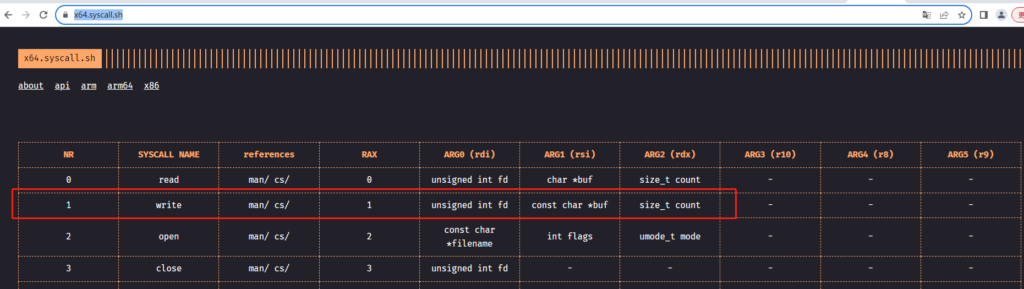
        # 设置系统调用号,1 表示write
        movq $1, %rax
        # 标准输出stdout
        movq $1, %rdi
        # 字符串指针
        leaq mystr(%rip), %rsi
        # 字符串长度
        movq $(mystrend-mystr), %rdx
        # 执行系统调用
        syscall
    
        # 设置系统调用号,60 表示exit
        movq $60, %rax
        syscall
    

    4.编译链接并执行

    # 编译
    as helloworld.s -o helloworld.o
    # 链接
    ld helloworld.o -o helloworld
    # 执行,控制台会输出 :Hello, world!
    ./helloworld

    参考资料:

    1. x64架构体系的系统调用列表:https://x64.syscall.sh/
  • No CMAKE_CXX_COMPILER could be found.

    错误信息

    在使用cmake 编译 flex&bison程序时,使用cmake的project()指令,编译报以下错误,错误具体信息:

    CMake Error at CMakeLists.txt:3 (project):
      No CMAKE_CXX_COMPILER could be found.
    
      Tell CMake where to find the compiler by setting either the environment
      variable "CXX" or the CMake cache entry CMAKE_CXX_COMPILER to the full path
      to the compiler, or to the compiler name if it is in the PATH.
    
    
    -- Configuring incomplete, errors occurred!

    原因是:cmake 的project() 命令在没有指定 LANGUAGES 选项时,默认是C和CXX(注意cmake 3.0之前的版本不支持LANGUAGES 关键字),CXX编译时需要指定 g++编译器。

    解决方法

    有2种方式:

    方式一

    在project() 命令中指定LANGUAGES 选项为C:

    project(test1 LANGUAGES C)

    方式二

    安装g++ :

    apt install g++
  • flex的开始状态

    是在flex定义部分中声明,开始状态(start states),也称为 开始条件(start conditions) 或者 开始规则(start rules)。

    开始状态的作用

    是用来限制特定规则的作用范围,或者针对文件的部分内容来改变扫描器的工作方式。即根据开始状态激活对应的规则(rules)。

    开始状态的模式

    开始状态有2种模式:

    1. %s :inclusive (包含模式),它允许未标记任何开始状态的rule 可以进行匹配。
    2. %x:exclusive(独占模式),它只允许标记为该开始状态下的rule 进行匹配。通常独占模式更有用。

    注意:在 flex定义部分中声明时 使用非缩进的形式。例如:

    /* definitions 定义部分 */
    %{
    
    %}
    %s simple
    %x test
    %%
    /*rule action  规则和执行动作 部分*/
    <simple>[0-9]+ {}
    <test>[a-z]+ {}
    %%
    /* helper function 辅助函数部分*/
    

    注意在规则部分中:开始状态名称和rule之间是没有空格的。

    开始状态的激活

    开始状态的激活需要使用:宏 BEGIN 进行激活。BEGIN的语法:

    BEGIN  statename;

    statename 是使用 %x 或 %s 声明的开始状态名称。Flex默认的开始状态是 零 状态,也称为 INITIAL。BEGIN(0)等价于 BEGIN(INITIAL)。

    注意:宏 BEGIN 本身是没有任何参数的,状态名字也不应该被括号括起来,但是加括号是一种良好的风格。

    示例

    分别使用2种状态模式对字符串数字”123.45″进行识别:

    %{
        #include <stdio.h>
        #include <math.h>
    %}
    
    %s expect
    
    %%
    
    "expect-floats" BEGIN(expect);
    
    <expect>[0-9]+"."[0-9]+ {
        printf("found a float,=%f\n", atof(yytext));
    }
    
    <expect>\n {
        /* BEGIN(INITIAL); */
    }
    
    [0-9]+ {
        printf("found an integer, = %d\n", atoi(yytext));
    }
    
    "." {
        printf("found a dot \n");
    }
    
    %%
    
    int main()
    {
        yylex();
        return 1;
    }

    CMakeLists.txt

    cmake_minimum_required(VERSION 3.20)
    
    project(startConditionTest LANGUAGES C)
    
    find_package(FLEX)
    
    FLEX_TARGET(myscanner startcondition_test.l ${CMAKE_CURRENT_BINARY_DIR}/startConditionTest.lex.c)
    
    # 设置主要包含的c文件
    set(MAIN_SRC ${CMAKE_CURRENT_BINARY_DIR}/startConditionTest.lex.c)
    
    # 使用源文件生成可以执行文件
    add_executable(conditionTest01 ${MAIN_SRC})
    
    # libfl.a
    find_library(LEX_LIB fl)
    TARGET_LINK_LIBRARIES(conditionTest01 ${LEX_LIB})

    包含模式%s

    使用包含模式:%s expect.

    编译并执行:

    mkdir build
    cd build
    cmake ../
    make
    # 执行
    ./conditionTest01 
    123.45
    found an integer, = 123
    found a dot 
    found an integer, = 45
    
    "expect-floats" 123.45
    "" found a float,=123.450000
    123
    found an integer, = 123
    

    执行结果如下图所示:

    独占模式%x

    使用独占模式:%x expect

    编译执行:

    └─# ./conditionTest01 
    123.456
    found an integer, = 123
    found a dot 
    found an integer, = 456
    
    "expect-floats"
    ""123.45
    found a float,=123.450000
    123456
    123456
    
    789
    789

    如下图所示:

    总结

    从执行结果上面可以看到:

    1. 独占模式被激活时,没有标记任何开始状态的rule,将不会被匹配。
    2. 包含模式被激活后,未标记开始状态的rule 也是可以进行匹配的。
    3. 和开始状态的模式小节中描述的是一致的。
  • 使用cmake编译flex

    环境

    Linux系统

    cmake版本:cmake version 3.25.1

    make版本:GNU Make 4.3

    flex版本:flex 2.6.4

    flex源文件

    catcot.l 文件

    %{
        #include <stdio.h>    
    %}
    
    %%
    c.t { printf("mumble mumble"); }
    cot { printf("portable bed"); }
    cat { printf("thankless pet"); }
    cats { printf("anti-herd");}
    
    %%
    
    int main()
    {
        /* 调用获取token */
        yylex();
        return 0;
    }

    CMakeLists.txt文件

    # 指定cmake 最低版本号
    cmake_minimum_required(VERSION 3.20)
    
    # 指定项目名称 和 语言
    project(catcot1 LANGUAGES C)
    
    # 查找依赖包
    find_package(FLEX)
    
    # 使用宏定义生成规则
    FLEX_TARGET(catcotScanner catcot.l ${CMAKE_CURRENT_BINARY_DIR}/catcot.lex.c)
    
    # 设置主要包含的c文件
    set(MAIN_SRC ${CMAKE_CURRENT_BINARY_DIR}/catcot.lex.c)
    
    # 使用源文件生成可以执行文件
    add_executable(catcotTest ${MAIN_SRC})
    

    编译

    # 第一步
    mkdir build
    # 第二步
    cd build
    # 第三步
    cmake ../
    # 第四步
    make 

    问题

    在编译部分 第四步 时会出现如下的错误提示:

    /usr/bin/ld: CMakeFiles/catcotTest.dir/catcot.lex.c.o: in function `yylex':
    catcot.lex.c:(.text+0x4e0): undefined reference to `yywrap'
    /usr/bin/ld: CMakeFiles/catcotTest.dir/catcot.lex.c.o: in function `input':
    catcot.lex.c:(.text+0x10de): undefined reference to `yywrap'
    collect2: error: ld returned 1 exit status
    make[2]: *** [CMakeFiles/catcotTest.dir/build.make:101: catcotTest] Error 1
    make[1]: *** [CMakeFiles/Makefile2:83: CMakeFiles/catcotTest.dir/all] Error 2
    make: *** [Makefile:91: all] Error 2

    问题解决

    解决上面的undefined reference to `yywrap’问题,有以下三种方法:

    • 方法1:在 catcot.l 文件头部添加:%option noyywrap
    • 方法2:在 catcot.l 文件中添加自己的yywrap()函数,返回值1
    int yywrap()
    {
       return 1;
    }
    • 方法3:在CMakeLists.txt文件末尾追加:
    # 添加 libfl.a 库
    find_library(LEX_LIB fl)
    # 链接 libfl.a 库
    TARGET_LINK_LIBRARIES(catcotTest ${LEX_LIB})

    这样可以使用默认flex的库libfl.a 生成的默认yywrap函数。

    以上3种方法,均已验证是可以的。

    推荐使用第 1 种方法。